Hexioon: A Stylish Script Font for Modern Design Workflows
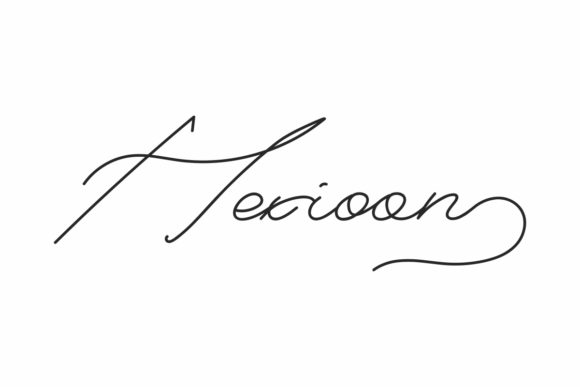
Hexioon is a stylish and delicate script font that brings elegance to any design project. Its clean, thin, and smooth characteristics make it an excellent choice for designers looking to add a touch of sophistication without overwhelming the visual hierarchy. As a PUA encoded font, Hexioon offers full access to glyphs and swashes, making it highly versatile for creative professionals across various industries.
Understanding the Role of Hexioon in Design Processes
Incorporating Hexioon into your design workflow can significantly enhance the aesthetic appeal of your projects. Whether you're creating logos, branding materials, or digital content, this font provides a refined look that complements both minimalist and intricate designs. Its versatility allows it to fit seamlessly into a wide range of applications, from print media to web-based interfaces.
Before beginning a project, consider how Hexioon aligns with your overall design goals. It’s important to evaluate whether a script font will support or detract from the message you want to convey. For instance, if your brand voice is professional and straightforward, using Hexioon sparingly might be more effective than using it extensively.
Integration During the Design Phase
During the design phase, Hexioon can be used as a primary or secondary font depending on the context. When designing headings or call-out sections, its elegant strokes can draw attention without being distracting. Pairing it with a sans-serif font for body text ensures readability while maintaining a balanced visual composition.
Designers often use tools like Adobe Illustrator or Photoshop to experiment with different font pairings. In these environments, Hexioon's PUA encoding makes it easy to access special characters and swashes, which can be particularly useful for adding unique flourishes to headlines or promotional materials.
Practical Use Cases for Hexioon
Hexioon's adaptability makes it suitable for various stages of a creative process. Here are some practical examples of where and how you can integrate it:
- Branding Projects: Use Hexioon for logos, taglines, or brand names to create a memorable identity.
- Marketing Materials: Incorporate it into brochures, flyers, or social media graphics to add a personal and artistic touch.
- Web Design: Apply it to website headers, buttons, or navigation menus to enhance user experience with visually appealing typography.
- Print Media: Utilize Hexioon in magazines, book covers, or packaging designs to elevate the overall presentation.
Each of these scenarios requires careful consideration of how Hexioon interacts with other design elements. Ensuring proper spacing, contrast, and alignment will help maintain a cohesive look throughout your project.
After Implementation: Maintaining Consistency
Once Hexioon is integrated into your design, maintaining consistency becomes crucial. This involves regularly reviewing how the font appears across different platforms and devices. Since typography can render differently on screens versus print, testing is essential to ensure uniformity.
Additionally, keeping track of font versions and updates is important for long-term use. If you're working on a collaborative project, sharing font files and style guides with your team ensures everyone adheres to the same standards.
Workflow Tips for Using Hexioon Effectively
To maximize the benefits of Hexioon in your workflow, consider the following tips:
- Prepare Your Assets: Ensure all necessary font files are organized and accessible within your design software. Having them readily available prevents delays during the creative process.
- Test Across Platforms: Preview your designs on multiple devices and browsers to check how Hexioon renders in different environments.
- Use Style Guides: Create a style guide that outlines specific uses for Hexioon, including font sizes, weights, and color pairings. This helps maintain consistency across all outputs.
- Stay Updated: Keep an eye out for new versions or updates related to Hexioon. These may include additional glyphs or improvements that could benefit your work.
By incorporating these practices into your routine, you'll not only improve the quality of your designs but also streamline your workflow, saving time and effort in the long run.
Compatibility and Usability Considerations
When choosing Hexioon for a project, compatibility with other design tools and platforms should be considered. Most modern graphic design software supports PUA encoded fonts, but it's always wise to verify this before starting a new project.
Usability is another factor worth noting. While Hexioon offers advanced typographic features, it's important to balance complexity with clarity. Overusing swashes or decorative elements can lead to visual clutter, especially in smaller formats like mobile screens or social media posts.
For those who frequently switch between different design applications, having a centralized resource for managing fonts can be beneficial. Tools like Adobe Fonts or Google Fonts provide easy access to a variety of typefaces, including Hexioon, ensuring that you can quickly locate and apply the right font for each task.
Conclusion
Hexioon stands out as a stylish and delicate script font that enhances the visual appeal of various design projects. By understanding its role in different stages of the creative process, you can effectively integrate it into your workflow and achieve professional results. Whether you're working on branding, marketing materials, or digital content, Hexioon offers a refined solution that complements both modern and traditional design approaches.